
Mokonyx
Manage and update your Joomla CMS website with step-by-step guides for content editing, menus, modules, and media.
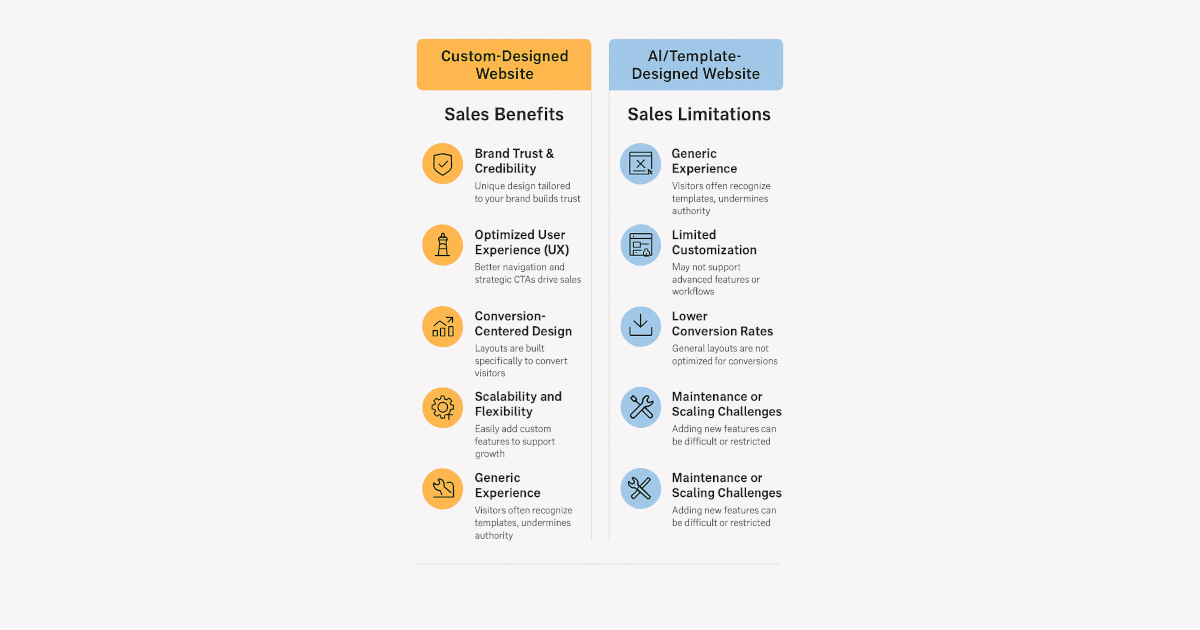
Custom vs. AI-Generated Websites: Which Drives Better Sales?
- Details
- Category: Mokonyx
- Applicable Software: Mokonyx
- Min Version Number: N/A
- Max Version Number: Not Applicable
Your website isn’t just your digital business card—it’s your 24/7 salesperson.
Thinking about going the AI/template route to save money? You might be leaving sales on the table.
💡 Here’s why a custom-designed website pays for itself in long-term ROI and conversions: 👇
- Hits: 200
What is Website as a Service?
- Details
- Category: Mokonyx
- Applicable Software: Mokonyx
- Min Version Number: N/A
- Max Version Number: Not Applicable
Website as a Service (WaaS) is Moko Consulting's managed Joomla hosting platform. We handle the technical infrastructure so you can focus on your content.
What's Included
- Joomla CMS — The latest stable version, kept up to date
- MokoWaaS Platform — Admin dashboard, security firewall, health monitoring
- Mokonyx Template — Modern responsive template with dark mode
- SSL Certificate — Automatic HTTPS for your domain
- Daily Backups — Automated backups with restore capability
- Grafana Monitoring — Real-time site health monitoring
Getting Started
See MokoWaaS Platform for detailed guides on managing your site.
- Hits: 32
🚀 Mokonyx Roadmap – See What’s Coming Next!
- Details
- Category: Mokonyx
- Applicable Software: Mokonyx
- Min Version Number: N/A
- Max Version Number: Not Applicable
🌟 Exciting updates are on the horizon!
Follow our development journey and see what’s next for our projects — your feedback can help shape the future.
- Hits: 354
Google Analytics and Tag Manager Integration
- Details
- Category: Features
- Applicable Software: Mokonyx
- Min Version Number: Development
- Max Version Number: Not Applicable
Supported Integrations
Mokonyx supports both Google Tag Manager (GTM) and standalone Google Analytics (GA4) integration, configured directly in the template settings.
Google Tag Manager
- Go to System > Site Templates > Mokonyx > Analytics tab.
- Enter your GTM Container ID (format:
GTM-XXXXXXX). - Save. The GTM snippet is automatically injected into the page head and body.
Google Analytics (GA4)
- In the Analytics tab, enter your GA4 Measurement ID (format:
G-XXXXXXXXXX). - The gtag.js script loads automatically with
anonymize_ip: truefor privacy compliance.
Smart Visitor Detection
When GTM or GA4 is active, Mokonyx automatically pushes anonymised visitor properties to the dataLayer:
- Login status (guest/registered)
- User group
- Page type (article, category, component, etc.)
These are set as GA4 user_properties for persistent session-scoped dimensions. No personally identifiable information (PII) is sent.
Print View Tracking
The component/print view automatically sends content_group: print_view to GA4, allowing you to track print and modal usage separately in your analytics.
Tracking the Administrator (Backend)
By default Mokonyx tracks only the public front end. If you also want to measure administrator (backend) usage, the companion Admin Extender plugin (System - Mokonyx Admin) can mirror your existing Google tracking into the Joomla administrator.
- Go to System > Manage > Plugins and open System - Mokonyx Admin.
- On the Analytics tab, set Track administrator to Yes (it is off by default).
- Save. The plugin injects the same GTM container and/or GA4 tag you configured on the site template — there is no separate ID to enter. If neither is configured on the site template, nothing is injected.
Keeping backend traffic separate
Administrator activity is staff activity, so Mokonyx flags every backend hit so you can segment (or exclude) it in your reports:
visitor_type = adminvisitor_group— the administrator's user grouppage_type = admin.<component>(for exampleadmin.com_content.article)
These are pushed via a moko.admin_view dataLayer event and set as GA4 user_properties. To keep your public-site metrics clean, add a GA4 filter or a Looker Studio segment that excludes visitor_type = admin.
Privacy and consent
The administrator is authenticated staff, so no cookie-consent banner is shown; Google Consent Mode grants analytics storage and denies advertising storage. Backend tracking is opt-in and can be switched off at any time from the plugin.
- Hits: 89
Installing Mokonyx Template
- Details
- Category: Getting Started
- Applicable Software: Mokonyx
- Min Version Number: Development
- Max Version Number: Not Applicable
Installing Mokonyx Template
Mokonyx is the custom Joomla template built by Moko Consulting. Follow these steps to install and configure it on your site.
Installation
- Download the latest Mokonyx template package from your Moko Consulting account or the provided link
- Log in to your Joomla Administrator panel
- Go to System → Install → Extensions
- Upload the template package file and click Upload & Install
- After installation, go to System → Site Template Styles
- Click the star icon next to Mokonyx to set it as the default template
Initial Configuration
Click on the Mokonyx template style to access its settings:
- Colour Theme — Choose from preset colour themes or define custom colours
- Logo — Upload your site logo
- Fonts — Select from available font families
- Layout — Configure sidebar positions and widths
Next Steps
After installation, explore the other Mokonyx articles to get the most from the template:
- Custom Colour Themes and Dark Mode, Theme Switcher and Accessibility Toolbar — branding and visitor controls.
- Social Media Icons — link your social profiles in the topbar, footer, or a floating bar.
- Google Analytics and Tag Manager Integration — measure your site (and, optionally, the administrator).
- Progressive Web App — make the site and admin installable.
- Font Awesome 7 Icons, Automatic Table of Contents, and Custom CSS and JavaScript Overrides — content and customisation.
- The Mokonyx Admin Extender — backend theming, admin analytics, and admin tools.
- Hits: 92
Subcategories
Mokonyx Article Count: 11
Mokonyx is a modern Joomla site template with dark mode support, custom page layouts, responsive design, and deep MokoSuite integration for white-label branding. Successor to MokoCassiopeia.
Getting Started Article Count: 2
Guides Article Count: 7
Features Article Count: 1
Troubleshooting Article Count: 1
MokonyxBackup Article Count: 15
What is MokoSuiteBackup?
MokoSuiteBackup is a comprehensive backup and restore solution for Joomla 6 (Joomla 4/5 supported). It provides full-site backups (database + files), multiple backup profiles, scheduled tasks, remote storage (FTP, Google Drive, S3), AES-256 encryption, content snapshots, automatic backup-before-update protection, and a standalone restore script.
Key Features
- Full, database-only, files-only, and differential backup types
- Multiple backup profiles with independent settings
- Backup before update & uninstall — a full-screen backup fronts Joomla core updates and any extension update or uninstall, so you always have a fresh restore point without white-screening large sites.
- Content snapshots & transfer — capture articles, categories and modules and move them between sites as a portable
.msbsnapfile, or push them master→slave directly via the injection API. - Joomla Scheduled Tasks integration plus web-cron for automated backups
- Remote storage: FTP/FTPS, Google Drive, Amazon S3 (+ Wasabi, B2, MinIO), with retention that prunes remote copies too
- AES-256 archive encryption
- MokonyxRestore standalone restore script for bare-server restores
- SHA-256 integrity verification
- Email and ntfy notifications on success, warning and failure
- REST API compatible with the MokoSuiteBackup MCP server
- AJAX step-based engine for shared hosting
- Execution-tuning wizard that paces backups to the host
Getting Started Article Count: 1
Guides Article Count: 11
Features Article Count: 1
Reference Article Count: 2
MokonyxCommunity Article Count: 1
Community profiles, connections, and activity streams for Joomla.
MokonyxEditor Article Count: 4
MokoSuiteEditor is an advanced WYSIWYG editor for Joomla 6, built on TinyMCE 8 with CodeMirror source editing. It adds per-user-group editor profiles, reusable content templates, a built-in media manager that replaces the core media modal, and a REST API. Documentation and help for installing, configuring, and using MokoSuiteEditor.
MokonyxExtensions Article Count: 40
Documentation and help for the MokoSuite family of Joomla extensions.
MokonyxPlatform Article Count: 39
MokoWaaS is the core site management suite for Joomla WaaS environments. Includes an admin dashboard, Web Application Firewall, tenant restrictions, security hardening, health monitoring, Grafana integration, and REST API.
Getting Started Article Count: 3
Guides Article Count: 27
Features Article Count: 6
Reference Article Count: 3
MokonyxHQ Article Count: 4
MokoSuite HQ - heartbeat, control panel maintenance, and messaging for all MokoSuite client installations.
Getting Started Article Count: 1
Guides Article Count: 3
MokonyxHero Article Count: 2
MokoSuiteHero is a Joomla module that displays a random hero image from a configurable folder. Ideal for dynamic homepage banners and portfolio showcases.
MokonyxSocial Article Count: 61
Social media publishing and Open Graph meta tag management for Joomla — a unified extension that cross-posts your content to social, email-marketing and chat platforms, and controls how your pages render as link previews (Open Graph, Twitter Card, JSON-LD). Merges the former MokoSuiteCross and MokoSuiteOpenGraph.
Getting Started Article Count: 6
Guides Article Count: 10
Features Article Count: 7
Reference Article Count: 1
Troubleshooting Article Count: 1
MokonyxStoreLocator Article Count: 1
Store locator listing package with component and modules for Joomla.